An introduction to
GEMDM Logo Environment Canada Canada
Last Update April 27,2004


RESEARCH Work:
15km:Lam vs Reg
10km:Lam vs Reg
   
VERSIONRel. Date
v_2.0.0 07/13/2000
v_2.1.0 09/20/2000
v_2.1.1 11/02/2000
v_2.2.0 11/17/2000
v_2.2.1 03/01/2001
v_2.3.0 07/16/2001
v_2.3.1 12/04/2001
v_2.3.2 04/23/2002
v_3.0.1 07/25/2002
v_3.0.2 12/24/2002
v_3.0.3 05/07/2003
v_3.1.0 06/19/2003
v_3.1.1 12/04/2003
v_3.1.2 04/27/2004
v_3.2.0 10/22/2004
v_3.2.1 incomplete
   
Quick References to:
Code Standards
GEMDM Environment
GEMDM flowchart
LAM


Introduction to GEMDM


GEMDM is a Distributed Memory version of GEM


The Distributed Memory (DM) implementation of the GEM model is one whereby a global domain of dimension G_ni x G_nj is split into subdomains of dimension L_ni x L_nj using a regular block partitioning technique. This partitioning is itself based on a user choice of 'Ptopo_npex' number of processors to split G_ni and 'Ptopo_npey' number of processors to split G_nj. This creates an array of subdomains to which we match an array of processors known as a 'processor topology' of (Ptopo_npex x Ptopo_npex). Each processor will compute only on its own local subdomain of dimension L_ni x L_nj.

A processor topology of (1x1) ie: Ptopo_npex=1 and Ptopo_npey=1 would look like this:


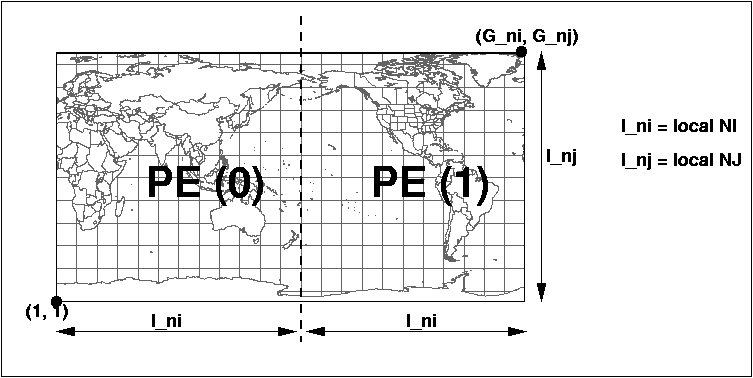
A processor topology of (2x1) ie: Ptopo_npex=2 and Ptopo_npey=1 would look like this:


Note that each PE will see a different value for its own l_ni,l_nj. The l_ni and l_nj values are determined at run-time based on the processor topology and number of gridpoints for the global domain (G_ni,G_nj). In the example above, the l_nj for PE 0 and PE 1 are equal to G_nj.
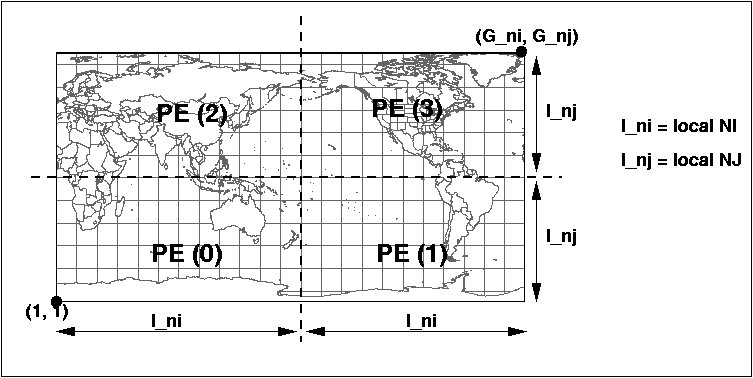
Here is an example of a processor topology of (2x2) ie: Ptopo_npex=2, Ptopo_npey=2


This DM implementation of GEMDM uses the Message Passing Interface (MPI) library. In this context, there will be n = (Ptopo_npex X Ptopo_npey) exact copies of the main program launched at once at startup. Those are known as the MPI processes to which a PE will typically be assigned. Through a serie of initial communications each PE obtains its rank and its position within the processor topology. Data decomposition can thereafter take place and the computation will start immediately after.

Because of horizontal dependencies inherent to the horizontal stencil of computation, exchange of data between processors will be required. For this reason a HALO communication region surrounds the actual computational region of every subdomain. This region is strictly used by MPI for inter-processor communication. All MPI functionality (primitives) are currently hidden under a special library called RPN_COMM. This library is maintained at RPN and is described in details at...

http://iweb.cmc.ec.gc.ca/rpn/mrb/si/eng/si/libraries/rpncomm/rpn_comm


The diagram below gives a more detailed layout of the domain decomposition of a (23 x 12) global problem size on a (2x1) processor topology:


Note that arrays with halos are formally shaped the following way:
field(l_minx:l_maxx, l_miny:l_maxy,l_nk)
or to shorten the declaration of these arrays, a macro called LDIST_SHAPE is also very often used:
field(LDIST_SHAPE,l_nk)

The macro LDIST_SHAPE is expanded at the pre-processor stage before compilation. There are other macros and they are defined in the "#include < model_macros_f.h >" statement. The most common ones used in the code are listed here:
MACRO
EXPANSION
LDIST_SIZ (l_maxx - l_minx+1)*(l_maxy - l_miny+1)
LDIST_DIM l_minx,l_maxx,l_miny,l_maxy
DIST_SHAPE Minx:Maxx,Miny:Maxy
DIST_SIZ (maxx - minx+1)*(maxy - miny+1)
DIST_DIM minx,maxx,miny,maxy
DCL_DYNVAR(Hzd, xp0_8,real*8 ,( HZD_MAX)) real*8 Hzd_xp0_8( HZD_MAX)
pointer( Hzd_xp0_8_ , HZD_MAX)
common/ Hzd / Hzd_xp0_8_
MARK_COMMON_BEG(Abc) integer Abc_first(-1:0)
common / Abc / Abc_first
MARK_COMMON_END(Abc) integer Abc_last
common / Abc / Abc_last


NAMING and CODING conventions in GEMDM

The routines, functions and comdecks are named to group towards related operations. Please see the naming and coding conventions of routines and variables specified in this document: revisions_doc/code_stds_gemdm.html
Here is a table (not necessarily complete) that shows the prefix names or keywords that relate to the functionality of the routines/functions:

PREFIX/KEYWORDFUNCTION RELATION
e_*entry program (e_gemntr)
p_*physics interface
c_*coupling interface (incomplete)
v4d_*4DVar general interface
*_ad4DVar: Adjoint
*_tl4DVar: Linear tangent
*_tr4DVar: Trajectory control
adw_*semi-Lagrangian advection
bac_*back substitution
bloc*,*slab*,*sor*,writ*output related
chem_*chemistry interface (incomplete)
hspng_*horizontal sponge
hzd_*horizontal diffusion
nest_*nesting mechanism for LAM
nli_*non-linear portion of reduced set of eqns
pre_*add metric corrections to R.H.S. of eqns
rhs_*right-hand side (R.H.S.)
set_*setup routines
sol_*solver
tr_*tracers
vspng_*vertical sponge
vte_*vertical interpolation


GEMDM ENVIRONMENT

The very first thing one must do to work in the GEMDM environment is to set/add the PATH to the proper version. This is done by issuing the command:

    . r.sm.dot gem [version]

For example:

    . r.sm.dot gem 3.1.1
    echo $PATH
    /data/local/tmpdirs/armnviv/11200/bin:/users/dor/armn/viv/ovbin/i686:/users/ dor/armn/viv/ovbin:/users/dor/armn/viv/ovbin:.:/usr/local/bin:......./usr/local/env/ armnlib/modeles/GEMDM/v_3.1.1/scripts:/usr/local/env/armnlib/modeles/ GEMDM/v_3.1.1/bin/Linux:

    echo $gem
    /usr/local/env/armnlib/modeles/GEMDM_shared/v_3.1.1


In this $gem path, one can find the RCS, the source code (src), scripts, and default data files that goes with this particular version. There is no executable in the environment. You must create your own for each platform that you want to run on. It will therefore be necessary to open an experiment with ouv_exp having minimally $gem/RCS_DYN as RCSPATH. A valid Makefile can be obtained with r.make_exp. We recommend you set your working directory on a file system with official system backups (/home/....) which contains the Makefile, the modified modules and directories with different running configurations,etc. Also, for each working platform [ARCH], you will need to create the following:

(1) directory of compiled code (*.o): malib[ARCH] where [ARCH] = Linux, IRIX64, or AIX

    ie: malibIRIX64, malibLinux, malibAIX

(2) the absolute (executable) files: maingemntr[ARCH]_3.1.1.Abs, maingemdm[ARCH]_3.1.1.Abs

    ie: maingemdmIRIX64_3.1.1.Abs, maingemntrIRIX64_3.1.1.Abs, maingemdmAIX_3.1.1.Abs, maingemntrAIX_3.1.1.Abs, etc.

These last two items take alot of space and do not need backup. It is suggested very strongly to create soft links for the directories and executables pointing to another disk system to avoid overflowing the quota.

Example:

    mkdir /data/dormrb04/armn/armnviv/v3.1.1/malibIRIX64
    ln -s /data/dormrb04/armn/armnviv/v3.1.1/malibIRIX64 malibIRIX64
    ln -s /data/dormrb04/armn/armnviv/v3.1.1/maingemdmAIX_3.1.1.Abs maingemdmAIX_3.1.1.Abs
    ln -s /data/dormrb04/armn/armnviv/v3.1.1/maingemntrAIX_3.1.1.Abs maingemntrAIX_3.1.1.Abs

(3) directories for interactive runs only: output, process,

Again, these two directories also take alot of space and, can be created on another file system without taking space on HOME. Create the soft links as well.

Example:

    mkdir /data/dormrb04/armn/armnviv/v3.1.1/process
    ln -s /data/dormrb04/armn/armnviv/v3.1.1/process process
    mkdir /data/dormrb04/armn/armnviv/v3.1.1/output
    ln -s /data/dormrb04/armn/armnviv/v3.1.1/output output

For creating absolutes:
You can create both absolutes (executables) with the target "gem" of the Makefile that would be valid for the current platform with:

    make gem

( in POLLUX, you would obtain maingemntrIRIX64_3.1.1.Abs, maingemdmIRIX64_3.1.1.Abs )

or, you can create only the entry program with:

    make gemntr

( in AZUR, you would obtain maingemntrAIX_3.1.1.Abs )

or, you can create just the main program with:

    make gemdm

( in Linux, you would obtain maingemdmLinux_3.1.1.Abs )

For creating absolutes with modifications to the code:

    If you have modified routines with no change in dependencies, then you can re-compile the routines with:
      make [routine1].o [routine2].o
      ie: make rhs.o nli.o (This will place the 'rhs.o' and 'nli.o' into malibIRIX64 if compiling on POLLUX)

    If you have modified a routine with changes in dependencies (ie: added or deleted comdecks), then you must redo the Makefile before re-compiling as follows:

      r.make_exp
      make [routine1].o [routine2.o]

    If you have modified the comdecks themselves then, you must redo the Makefile, remove the old '*.o' (for coherency) and compile all the routines affected by the modified comdecks by:

      make clean (does not remove '*.o' in malib[ARCH])
      r.make_exp (rebuild Makefile)
      rm malib[ARCH]/*.o (removes all the old '*.o')
      make objloc (creates all new '*.o')

    Example for Linux:

      make clean
      r.make_exp
      cd malibLinux
      \rm *.o
      cd ..
      make objloc

    Then after the compilations, rebuild the absolute as shown above:

      make gem

For further details in compilations and building absolutes, see documentation on r.compile, r.build in the RPN website: http://http://iweb.cmc.ec.gc.ca/rpn/mrb/si/eng/si/utilities .
Comparisons of your modifications can be made easily to the original source code (found in $gem/src/).


HOW TO RUN GEMDM

You can obtain a copy of the sample debug configuration files gem_settings.nml, outcfg.out and configexp.dot.cfg by running the script "gem_config dummy". This will produce a sub-directory "dbg1_configs" containing these 3 files.

    (1) gem_settings.nml contains the namelists for controlling the model execution
    (2)outcfg.out is to control the output of the model
    (3)configexp.dot.cfg is to control where the model will be launched, chosen initial analysis, climatology files, max memory, cpu time, etc.

One can find documentation on the configuration files for gem_settings.nml and outcfg.out in a file called gem_settings.doc stored in the RCS. It can be extracted by typing:

    omd_exp gem_settings.doc

One can find all the scripts related to a particular version of GEMDM in $gem/scripts
One can find default analysis,climatology and entry files under $gem/dfiles/bcmk/. The scripts will use these defaults if no specifications are given.

RUNNING INTERACTIVELY

This can be done on either POLLUX or LINUX presently.
Besides having valid sub-directories output and process, and an "absolute" that has been generated for the right machine, a copy of the files gem_settings.nml must be placed locally in the working directory. The file outcfg.out is optional.
Then, to execute, use these following scripts:

    Um_runent.sh (or 'runent')
    Um_runmod.sh (or 'runmod')

The above will use default files. Here is an example in using specific analysis or climatology files:

    Um_runent.sh -anal myanalysis -climato myclimato

The output of a run (Um_runmod.sh) will be found in the sub-directory "output" in the form of binary slab files. To convert them to RPN standard files, execute the following scripts above the directory output:

    delam (or 'delam -reps output')
    d2z -rep output -nbf 4 (where 4 is the number of PE's used in the run)

An example if the slabfiles are saved in another directory name other than output such as output2, and, the run is Ptopo_npex=1, Ptopo_npey=2:
The following commands to obtain RPN standard files would be:

    delam -reps output2
    d2z -rep output2 -nbf 2

A file is produced by each PE if the local domain contains part of the output grid. For visualization, these slab must be post-processed with a program called "delamineur2000" (inside script delam ) to convert the files to RPN Std '#' grid files (See http://iweb.cmc.ec.gc.ca/rpn/mrb/si/eng/si/misc/grilles.html#diese)

If the run was done with more than 1 PE, each '#' RPN file displays only what each PE 'sees' as its local domain. To visualize the 'complete' grid, one must reassemble the '#' grid files to one 'Z' grid file by using the program bemol2000 (inside script d2z ) (See http://iweb.cmc.ec.gc.ca/rpn/mrb/si/eng/si/utilities/bemol/index.html.

RUNNING BATCH MODE

First, you must create (do not link) directories called 'gem' and 'listings' on your $HOME if they do not exist. The execution directory (EXECDIR) on the execution machine (mach) has the generic form:

    ${HOME}/gem/${mach}/${exp}

The launching scripts will require ${HOME}/gem to already exist. The purpose of this is to force the user to provide space for the execution of the model through a proper link of directory ${HOME}/gem.


For example:
    cd
    mkdir gem
    mkdir listings
Batch mode means finding an execution directory on a file system that the platform can see. Now create soft links under the directory gem for the intended platforms.
Example:
    cd gem
    ln -s /fs/mrb/02/armn/armnviv azur (for azur)
    ln -s /data/dormrb03/armn/armnviv/pollux pollux (for pollux)
    ln -s /data/local2/armn/armnviv/lorentz lorentz (for lorentz)
You can also redirect listings to respective platform directories.
Example:
    cd
    cd listings
    ln -s /fs/mrb/02/armn/armnviv/listings azur (for azur)
    ln -s /data/local2/armn/armnviv/lorentz/listings lorentz (for lorentz)
To launch a batch job, one must go to your working directory, create the absolutes for the designated platforms and modify the file configexp.dot.cfg. to control the batch mode configuration.
Some hints on its controls:
    exp=[experiment name];
    model=[gem/mc2];
    version=3.1.1;
    t=[number of seconds for wall clock];
    d2z=1; to automatically re-assemble output
    mach=[machine];(azur,pollux,lorentz)
    listing=/users/dor/armn/viv/listings;

Then, to launch the model in batch mode on any platform or backend, execute the script

    Um_launch [exp]

where [exp] is the name of a subdirectory (like dbg1_configs) containing files gem_settings.nml, outcfg.out and configexp.dot.cfg.
(use Um_launch -h for more details).


KEEPING INFORMED ON CHANGES!!

To be kept informed of current developments and problem-solving related to GEMDM, one should subscribe to the "gem" mailing list by sending an e-mail to "Majordomo@cmc.ec.gc.ca" with the line:

subscribe gem

One can follow the progress, changes, and evolutions of GEMDM by referring to the revision documents under VERSION and its release dates


GEM in LAM CONFIGURATION

For those who want to try GEM in a Limited Area Modelling LAM configuration, here is an example of a LAM grid definition. Complete details of the namelist variables are described in gem_settings.doc


For more information on LAM, refer to: lam seminar


authors: V.Lee, M.Desgagné (March 2003)